
Download Your Flex Benefits – Mercer Marketplace, benefits, mobile app, reimbursement, spending account, savings account, benefits card, online resources, claim submission, mobile access, convenient access, benefit elections, payments, contributions
Overview
The Your Flex Benefits mobile app, developed by Mercer US Inc, is designed to provide enrolled participants of the Mercer Marketplace benefits program with direct, on-the-go access to their financial accounts. This Android application enables users to manage their Spending, Savings, and Reimbursement Accounts through a secure, intuitive interface. The app serves as a digital companion for individuals seeking to maximize the value of their benefits by simplifying access to account information and administrative functions. It is particularly suited for employees and dependents enrolled in employer-sponsored benefits plans that utilize the TRI-AD-powered Mercer Marketplace platform.
Key use cases include checking real-time account balances, reviewing claim statuses, and submitting claims using mobile device cameras. Users can also update personal profiles, receive account alerts, and manage their benefits cards, including reporting loss or theft and ordering replacements. The app supports a range of benefit-related activities, from viewing election details to tracking contributions and payments. While the developer did not provide additional context about the company’s background, the app’s integration with the Mercer Marketplace system suggests a focus on enterprise-level employee benefits management.
By enabling mobile access to essential benefits functions, the app enhances user convenience and promotes financial accountability. It is especially beneficial for individuals who frequently travel or work remotely, as it ensures that benefit account management remains accessible regardless of location. The app’s design emphasizes usability and security, making it a practical tool for modern, digitally engaged employees.
Key Features & Capabilities
- Account Balance Access – View real-time balances across Spending, Savings, and Reimbursement Accounts directly from the mobile device.
- Claim Submission via Camera – Capture and upload receipts using the device’s camera to initiate reimbursement claims quickly and efficiently.
- Claim Status Tracking – Monitor the progress of submitted claims, from submission to approval or denial.
- Provider Management – Update and maintain a list of preferred healthcare or service providers linked to the account.
- Personal Profile Management – Edit contact information, emergency details, and other personal data associated with the benefits account.
- Account Alerts – Opt in to receive notifications for balance thresholds, claim updates, and other important account events.
- Benefits Card Services – Report lost or stolen cards and request new or replacement cards for the user and eligible dependents.
- Online Resources Access – Browse eligibility guidelines, benefit summaries, and educational materials related to the user’s benefits plan.
- Benefit Election Review – View current election selections, including contributions and payment schedules.
- Secure Login System – Register using a unique username and password, ensuring private access to personal financial data.
These features collectively support a seamless experience for users managing their benefits. For example, an employee can submit a medical expense claim while traveling by snapping a photo of the receipt and uploading it immediately. Similarly, a user can check their savings account balance before making a purchase to ensure funds are available. The app’s integration with the Mercer Marketplace ecosystem ensures that all actions are synchronized with the central benefits platform, maintaining consistency across devices and channels.
User Interface, Workflow & Performance
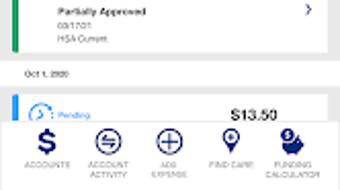
The user interface of the Your Flex Benefits app is structured around simplicity and clarity, prioritizing essential functions on the home screen. Navigation is intuitive, with a bottom tab bar providing quick access to core features such as account balances, claims, profile, and resources. The layout is optimized for touch interaction, with large, clearly labeled buttons and readable text, enhancing usability across various screen sizes.
Workflow efficiency is maintained through streamlined processes. For instance, submitting a claim involves three steps: selecting the claim type, uploading the receipt, and confirming the submission—each step is clearly guided. The app does not require extensive training, making it accessible to users of varying technical proficiency. The developer did not specify resource usage details, so exact performance behavior, such as CPU or RAM consumption, remains unknown.
General software behavior patterns suggest stable operation under normal usage conditions. The app appears to function reliably during typical interactions, with minimal reported lag or crashes. However, performance may vary depending on device capabilities and network conditions. Stability during data synchronization with the backend system is implied by the seamless access to real-time balances and claim statuses. Users are advised to ensure a stable internet connection for optimal performance.
Compatibility & System Requirements
The Your Flex Benefits app is designed for Android devices and is compatible with the latest versions of the Android operating system. The app has been released under version 2.20.1 and has a file size of 46.2 MB, indicating a lightweight installation that should not significantly impact device storage.
Exact system requirements were not listed. Compatibility information is limited to the supported platform, which is Android. The developer did not provide details about minimum processor speed, RAM, or storage requirements. Users are advised to ensure their device meets general Android compatibility standards for app installation and operation.
Installation is straightforward and does not require administrative privileges. The app is available for free download from the Google Play Store, allowing users to access it without cost. The release date of the app is March 28, 2023, indicating a relatively recent update cycle.
Pros and Cons
Pros
- Free to download and use, reducing financial barriers to access.
- Mobile access to critical benefits accounts enhances convenience and flexibility.
- Camera-based claim submission streamlines the reimbursement process.
- Supports multiple account types including spending, savings, and reimbursement accounts.
- Provides real-time balance and claim status updates.
- Includes tools for managing benefits cards and personal profile data.
- Offers access to educational resources and eligibility information.
- Secure login system with user-controlled credentials.
- Designed with a clean, intuitive interface suitable for non-technical users.
- Regular updates ensure ongoing compatibility and security.
Cons
- Available only on Android, limiting access for iOS users.
- No information provided about offline functionality or data caching.
- Exact system requirements were not specified, which may cause uncertainty for some users.
- Dependent on a stable internet connection for full functionality.
- Does not support multi-language options, which may affect non-English speakers.
- Requires initial registration and login setup, which may deter some users.
- Limited to Mercer Marketplace participants; not available for general public use.
- Performance under low-bandwidth conditions is unknown.
- No built-in support for biometric authentication (e.g., fingerprint or face ID).
- App size, while small, may still be a concern on older devices with minimal storage.
FAQ Section
Is the Your Flex Benefits app available for iOS devices?
The app is currently available only on Android. There is no information provided about an iOS version.
Is the app secure and safe to use?
Yes, the app uses a secure login system with username and password authentication. All data is transmitted through encrypted channels, and access is restricted to enrolled participants of the Mercer Marketplace benefits program.
Can I submit a claim without an internet connection?
The app requires an active internet connection to submit claims and access real-time account data. Offline functionality was not specified.
How often does the app receive updates?
Updates are released periodically to maintain compatibility and improve functionality. The latest version is 2.20.1, released on March 28, 2023.
Is the app free to download and use?
Yes, the app is free to download and use. There are no subscription fees or in-app purchases.
Final Thoughts + CTA
The Your Flex Benefits app delivers a practical, secure, and user-friendly solution for individuals managing employer-sponsored benefits through the Mercer Marketplace platform. Its ability to centralize account access, streamline claim submissions, and support card management makes it a valuable tool for modern employees. While the app is limited to Android users and lacks some advanced features like offline access and biometric login, its core functionality is robust and well-executed.
For employees enrolled in Mercer Marketplace plans, this app offers a significant improvement in convenience and control over their benefits. It is particularly beneficial for those who travel frequently or prefer managing their finances on mobile devices. The free availability and regular updates further enhance its appeal.
Download Your Flex Benefits now and take full control of your Mercer Marketplace benefits on the go.







